INSTRUCTIONS FOR SETTING UP BROADCASTING VIA THE RADIOBOSS PROGRAM
First of all you need the program RadioBOSS, you can download it here.
Launch the RadioBOSS program. To configure the broadcasting plugin, go to Settings

RadioBOSS program settings
The settings window will appear. In the window that opens in the “Broadcasting” section, enter all the data from your personal account:
In the Server – enter the broadcast server address, the port with a colon and the broadcast point with a slash (in our example it is mp3.radiostyle.ru:8002/house)
In the field Format – choose MP3
In the field Bitrate – enter the broadcast bitrate (in our example it is 128 )
In the field Password – enter the password on the broadcast server (Click on the “View Password” link to view the password)
Check the “Enable broadcasting” and “Auto reconnect” checkboxes.
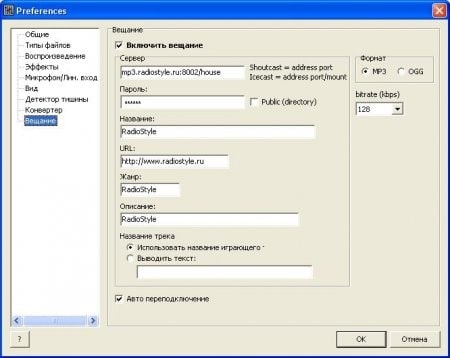
Enter the broadcast settings.
After restarting the program, start the music. If you have done everything correctly in the log window you will see the entry Connected to server! and your radio station will automatically switch to the music you are playing in RadioBOSS.
Now all the music you play in RadioBOSS will be streamed to the network (and if you plug in a microphone, listeners will hear it too). To stream audio from a microphone or other sound source, click on the MIC icon in the Effects menu.